

Captions land exactly on the speech. I used to spend evenings nudging lines around by hand.
AI Subtitle Generator: Captions for Any Video, Automatically
Upload a video or paste a link and AI generates timed subtitles you can style, edit and export in minutes.
MP4, MOV, MKV & more · up to 8 GB per file · export SRT, VTT or MP4
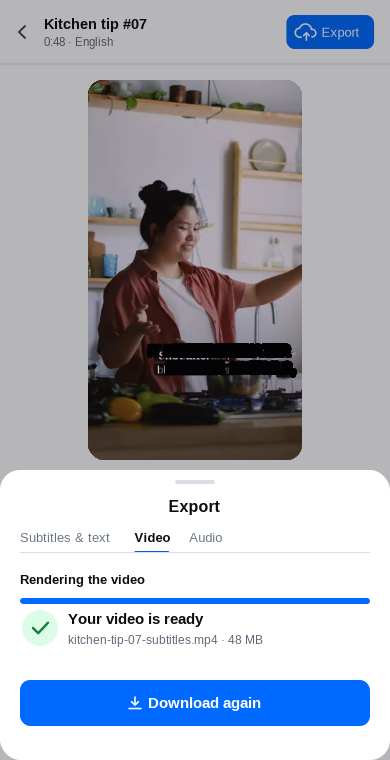
Captions appear as they're spoken

Film the hook first.
Everything else can wait.
Then cut the rest.
Click or drag & drop to upload your audio or videoTap to upload your audio or video
MP3, MP4, M4A, MOV, MKV, WEBM, AVI, WAV, FLAC, AAC, OGG, OPUS, WMA, WMV
No credit card required · Stored in the EU · Never used for AI training
Generate Subtitles from Video That Viewers Can Follow


Every caption is aligned to the exact moment it’s spoken — automatically. No more nudging lines around by hand.
Generate captions in more than 120 languages and dialects, with automatic language detection for mixed content.
Generate subtitles once, then translate the file into 50+ languages with the timing kept — on paid plans from Creator.
How to Auto-Generate Subtitles in 3 Steps
From upload to export-ready captions in minutes.
Auto Generate Subtitles30 free minutes · No credit card


Drop in MP4, MOV, MKV or WEBM up to 8 GB — or paste a YouTube/Vimeo link and we’ll fetch it for you.
Select the source language and the AI creates perfectly timed captions, split into natural, readable lines.
Adjust timing and text on a waveform-synced timeline, then export SRT, VTT or an MP4 with burned-in subtitles — or translate into 50+ languages first on a paid plan.
An AI Subtitle Generator with a Full Editor
Generate, edit, translate and export — without leaving the browser.
Frame-accurate timing
Captions are auto-synced to speech with clean in/out points — ready for YouTube, courses or broadcast.
Timeline editor
Split, merge, retime and rewrite captions on a visual timeline synced to the waveform. What you see is what viewers read.
120+ caption languages
Caption content in more than 120 languages and dialects with automatic detection.
Translate into 50+
Turn one subtitle file into 50+ languages with timing preserved — available on paid plans.
Export SRT, VTT or MP4
SRT and VTT drop straight into YouTube, Vimeo, Premiere and DaVinci; an MP4 with burned-in subtitles renders right in your browser.
Readable by design
Line lengths and breaks follow readability rules, so captions are comfortable to follow at any playback speed.
Import from links
Paste a YouTube or Vimeo link and caption the video — no need to save it first.
Private & GDPR-ready
Speech is transcribed on our own servers in the EU, footage is encrypted in transit and never used to train AI. The MP4 export renders in your browser, so the video isn’t sent anywhere again.
Why Creators Pick Our Subtitle Generator

No more nudging every line by hand. AI aligns each caption to the exact moment it’s spoken, and the waveform-synced timeline lets you fine-tune anything in seconds.
Generate captions once, then translate them into 50+ languages while keeping the timing. Localize your content for a global audience without re-timing a thing — translation comes with paid plans.
Split, merge, retime and rewrite captions in a visual editor synced to the audio. Instant preview shows exactly what your viewers will read — before you export a single file.
Loved by Creators, Teams and Researchers
Rated 4.8/5 on G2
YouTube kept mangling our brand names. Now I fix them once in the editor and upload a clean SRT.
Uploaded a two-hour recording during lunch — the transcript was waiting before I finished my coffee. The accuracy genuinely surprised me.
Our legal team approved it because processing stays on EU infrastructure. That alone ruled out most of the competition.
Captions split where a human would split them. Viewers stopped complaining about walls of text.
Added captions to every short — average watch time rose noticeably within a month.
No card, no tricks — I tested real files before paying and upgraded a week later because the workflow stuck.
Had trouble with a huge file — support walked me through batch upload the same morning. Rare these days.
An AI subtitle generator listens to the speech in a video and writes timed subtitles automatically. BlaBlaScribe transcribes the audio in 120+ languages, splits the text into readable lines synced to the voice and lets you adjust the wording, timing and style on a timeline. Export SRT or VTT, or an MP4 with the subtitles burned in, and translate them into 50+ languages when you need other markets.
SRT and VTT — accepted by YouTube, Vimeo, LinkedIn, Premiere, Final Cut and DaVinci — an MP4 with the subtitles burned in, and plain text. The free plan exports SRT and TXT, plus the first 90 seconds of an MP4 with a small watermark.
Captions are aligned to speech automatically with clean in and out points. If anything needs adjusting, the waveform-synced timeline lets you retime a line in seconds.
Video files up to 8 GB are supported. That comfortably covers long-form content — lectures, podcasts, webinars and full events.
Yes — on paid plans, into more than 50 languages with the original timing preserved. One subtitle file becomes a complete localization kit.
Over 120 languages and dialects, with automatic language detection. Mixed-language content is handled gracefully.
Yes — everything runs online: generation, the timeline editor, translation and export.
You can start free, no credit card: 30 free minutes once, with short videos subtitled in full and the first 10 minutes of longer ones. Export SRT, or the first 90 seconds of an MP4 with a small watermark.
Discover more
More subtitling tools
Subtitle TranslatorThe same cues in 50+ languages, timings kept.Video to TextA full transcript with speaker labels and timestamps.YouTube Transcript GeneratorPaste a link and read the transcript.AI TranscriptionTranscribe audio and video in 120+ languages.Add Subtitles to VideoStyled subtitles, burned into an MP4Captions for TikTok, Reels & ShortsBold captions for vertical videoWord-by-Word CaptionsWords appear as they’re spokenSRT GeneratorBest AI subtitle generators